




Dual Decryption Core Technology
 Last week we have made a lot of improvements across several of our products. Monday & Tuesday were bug squashing days, we went through the bugs that have been submitted via https://support.ownwebnow.com/create.asp?item=development and resolved most of the outstanding issues. Remember, if you have an important bug make sure you submit it to our development queue. The rest of the week was spent implementing our new message decryption engine across several of our platforms.
One of the most common and repeating issues was in regards to rendering issues with messages viewed at https://encryption.exchangedefender.com and SPAM previews through ExchangeDefender. While most messages would render without any problems, there were still those handful of clients who had issues with some messages. Typically this was caused by the use of different 3rd party e-mail clients that would use an unexpected RFC type or submit the data using a weird/foreign content-encoding type. This is even more prevalent in SPAM previews, because most of the time those messages are garbled or gibberish! So that makes the decryption process even more challenging!
So these last few months, we’ve been examining a new core technology to decrypt these messages and help bring more legible content to our users and their clients. With this new decryption core it handles most MIME types flawlessly and adheres to most RFC standards for messages. We ran it through several test cases where previously: “the messages was unpleasant to read” and it converted them to “a perfect rendered instant of the original message”. However, there are still the few instances where our old engine is better than the new decryption core.
That’s why we’ve implemented dual decryption core technology. This is a custom implementation that will programmatically decide which engine is best to use on a per message basis. First, it examines the message and tries to load it with the new decryption engine, while it decodes the message it makes note of any issues that have occurred upon the decryption process. If there was an issue, it will run the message through the second decryption engine and compare the results, then render the best instance of that message.
You’re going to see a lot of rapid development over the following months here at ExchangeDefender. Like I discussed in previous posts, we’ve starting to implement SOAP across several platforms and it’s really taking hold. The Compliance Archive enhancements, Decryption Engine enhancement and even planned Shockey Monkey Dynamic Callback Mechanism have all been made possible by the use of SOAP that we’ve implemented here at ExchangeDefender over the past several months.
Hank Newman
VP Development, ExchangeDefender
hank@ownwebnow.com
“Find a Need, Fill a Need.” Is this the right way to go to market?
 Companies invest a lot of time, money, and resources into the creation of their products and services. Yet, these valuable resources usually dive deeply into how their product works or what its function is – while often ignoring or rather wrongly focusing on how to attract clients to what they are selling. This is where marketing plays its role.
Any outreach that comes into contact with a prospective client in any way, shape, or form is performing a marketing function. The question is, do companies know how to perform marketing functions in a way that accurately represents their organization while effectively reaching their target market?
My hope with this post is to paint a vivid picture of the difference between a client’s needs and wants and also layout some common problems or challenges that businesses face while trying to figure out the best strategy that they should use when marketing to their client base.
Let’s start with the idea behind the title of this post…
“Find a need and fill it – Is this really the key to successful marketing?”
In the past, businesses were built on satisfying customer’s needs. While this is still the case, however, now, it’s more about customer’s wants. The real question is if people actually understand what they need vs. what they want?
Need – Loosely defined as something that is necessary for survival.
Want – Loosely defined as a wish, craving, demand, or desire for something.
Many needs can be translated into wants when the right message is sent to consumers. People may not need to get the latest brand new thing, but they want to feel that sense of security, excitement and success that goes along with having something shiny and new to show off.
As with everything in life, there are always multiple opinions on theories or ideas and marketing is no exception. Just because some marketing advice is repeated often, doesn’t necessarily make it true or applicable in all situations especially in business. I both agree and disagree with this statement and will explain why.
“Find a Need, Fill a Need”
If you follow the “find a need and fill it” marketing strategy you will be inviting commodity pricing. Think about this… People need a computer network set up … but they want someone who understands their business, and that will suggest things to make it run smoother before an outage occurs.
People price shop for what they need. Most things that people need have multiple alternatives and competition in the marketplace. Therefore, people tend to buy things that they need based on cost by going for the most cost-effective option. Alternatively, people will pay premium prices for things that they want without even thinking about it. Take Apple for example, Apple understands that people will buy what they want regardless of the price that they have to pay to get it. There is a certain allure and sense of satisfaction when purchasing something that one wants. The “Find a need and fill it,” approach is great for getting in the door with a client, particularly if you’re the first to knock and their need is urgent…nonetheless, that approach may not always win you the client or retain the long term business that you are inevitably going for. After that point is when you market to clients based on their wants.
People will pay for the intangible things – are you proving these?
“Find a Want, Fill a Want”
On the flipside, if you follow the opposite “Find a want, fill a want” strategy it could lead a new marketing revolution for your company. Of course there is always a process in finding both needs and wants, it is essential that both be filled. To fill a need is not just about filling the gaps but to really provide a solution – and a lasting one at that – thus creating a long-term revenue stream. To satisfy your customers you must both fill the need and keep your customers happy by giving them want they want. But the trick to this is…When finding what they want; you can turn that want into a need by offering the solution to their problem. Think about Technology. Everybody NEEDS it, but if a company also provides stellar support and excellent customer service, you fill the need and also provide a premium service making it a want and therefore more attractive to a prospective client.
How do you find your customers’ needs?
It is not always easy to find one’s needs. Watch for trigger phrases from your clients – People will rarely say that they need your product or service. What they will do, however, is lament the lack of something, or talk about a specific problem or even state an aspiration for something. For example, Instead of a customer saying “I need some new accounting software” they will say something like “I can’t ever get a handle on my receivables.” This then will open the door for you to offer a solution to their problem thus making your offering both a want and a need for them. Also, this will make your company stickier to your clients because you will be providing them with more than just a commodity that the “next guy” could offer them. They will find value in your offering thus making client retention much easier.
ExchangeDefender’s Approach
 At ExchangeDefender, we go to market with both strategies in mind – filling needs AND wants. For example, ExchangeDefender’s LiveArchive product is an enterprise-grade business continuity platform that lets you resume work right where you left off if the Internet connection was interrupted or other technical glitches got in the way of getting things done. The best part of all is that LiveArchive is always on, constantly archiving your sent and received mail, so there is no maintenance or management to worry about in case of an outage. So, when doing marketing for LiveArchive we market it as a feature that you want to have to make your offering more attractive to your prospective clients and it will most definitely be something that you need in the event of an outage. We look to fill the essential needs of our clients while also providing them with intangible things that they want like, great customer service and technical support, and also the intangible satisfaction of knowing that if an outage were to happen that they will already have business continuity built-in and in place that they can rely on when they need it.
Final Thoughts
Marketing is very “cloudy” because there is not a right or wrong strategy. The bottom line with marketing is that people buy and will continue to invest in products and services that solve their problems. People don’t necessarily buy something just because they need it or want it. Naturally, price, or ‘value’ will always be an issue with most people but if you have the best solution to solve their problems, then price will be much less of a concern. The goal should always be to create win-win situations for both you and your clients – so find your niche and protect it!
How can I help?
Please let me know if there is anything that I can do in terms of helping you about with marketing. We have a ton of resources to offer our partners including marketing collateral so please take advantage of that and don’t hesitate to contact me!
Stephanie Hasenour
VP, Marketing, ExchangeDefender
stephanie@ownwebnow.com
(877) 546-0316 x735
ExchangeDefender Executive Podcast #2
Good news – you loved ExchangeDefender Executive Podcast #1 and it seems like the idea really resonated well with our partners that are trying to stay on top of everything but just don’t have the time for it all. I’ve been fortunate enough to speak to many of our partners this week and I’m amazed at how many of you found it worthwhile – so we will keep on doing it every week. Keep the feedback coming:
 Download ExchangeDefender Executive Podcast #2 (mp3, 13mb)
Here is a brief summary of what we talked about:
Development
– Testing of the new Compliance PST import tool
– Revamp of ConnectWise integration (using callbacks, no more emails)
– Shockey Monkey Chat audio alerts
– NOC updates to @xdnoc twitter, timestamp bug fixedMarketing
– Halloween Promotion
– ConnectWise promotion, room drops, etcNetwork Operations
– Dewey MBOX2 nightmare
– Exchange 2007 vs. 2010: Why you need to move to 2010
– Rockerduck georedundandcy update
It’s been a busy week for us, next week we will be at HTG and ConnectWise, week after that we’re unveiling new Shockey Monkey partnerships and an upgrade to our Looks Cloudy site.
P.S. Apologies in advance over the audio quality, new audio and video gear is on it’s way and #3 will sound great. In the meantime, our apologies for the popping p’s.
Sincerely,
Vlad Mazek, MCSE
CEO, Own Web Now Corp
vlad@ownwebnow.com
(877) 546-0316 x500
(407) 536-VLAD
ExchangeDefender LoadBalancer
On a random basis, one of the most pressing issues faced by our customers was mail delivery delays. These random delays happen to only about 12% of the nodes, however, due to the sheer volume of mail processed by our inbound network that 12% would inevitably cause our staff and customers quite an inconvenience.
As more and more companies begin to depend on email for the main source of communication for their business, mail delivery time becomes a major factor when partnering with a hosting vendor. Because of the critical need for instant delivery, we had to quickly overcome our growth and produce an immediate solution.
The Unforeseen Weakness in Round Robin
After the ATS power outage earlier this quarter we were forced to reevaluate or solutions across the board and make drastic improvements. One of the areas that desperately needed a redesign was our inbound mail load balancer.
In the early days of ExchangeDefender we utilized a round robin based load balancer. In short how it works is the MX records for ExchangeDefender clients are pointed to both our Dallas datacenter and our Los Angeles data center. After the SMTP connection hit either data center, the connection was then forwarded off to any random inbound node in the virtual server list.
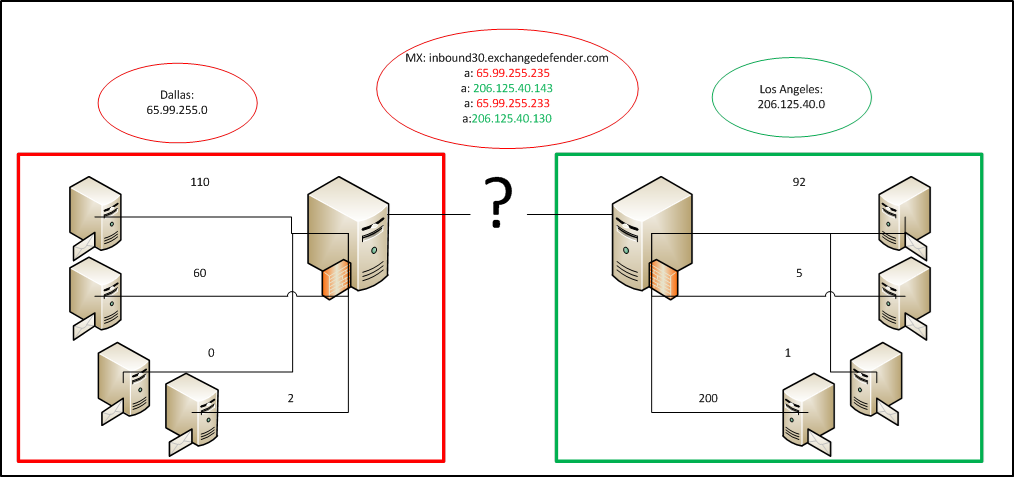
Until earlier this year, the round robin design worked quite well, however, as the number of messages being processed grew, so did the delivery delays. We started to notice that the load balancer that was able to previously balance the connections was no longer balancing at all. Day after day, we saw some inbound servers having upwards of 200 concurrent connections at a time. More than half of the other inbound nodes in the respective data center had no connections at all.
The biggest issue preventing the round robin configuration from working was the randomized assignment of which data center would be used and which inbound server that would receive the connection. To begin to tackle the issue, we had to re-evaluate the entire load balancing solution because you can never properly balance a round robin based connection. We switched our load balancers to use a weighted least connection based routing scheme. Upon activation it seemed to balance connections a bit better than the round robin connection. Nearly an hour after activation however, we saw a large queue size being placed on a few inbound nodes.
Brand New Logic
To completely resolve the issue, we had to introduce additional logic to the load balancer. The recurring issue we faced was the basic nature of SMTP. An SMTP connection for one “message” being transmitted could equal four concurrent open connections. Therefore, naturally, the connection count cannot be relied upon for load balancing. We then decided to leverage our queue reporting service which reports the number of queued messages and open conversations with unique IPs. Finally, we created a PHP script that runs on the load balancer and splits itself to check the connection counts across all nodes every 10 seconds. We used a very simplistic formula for load balancing:
If(($numActiveServersInSite >= ($numServersInSite / 2)) && ($nodeConnections >= ($nodeAverageConnectionCount + 50)) && ($nodeConnections <= $highThreshold)){Shutoff new connections}
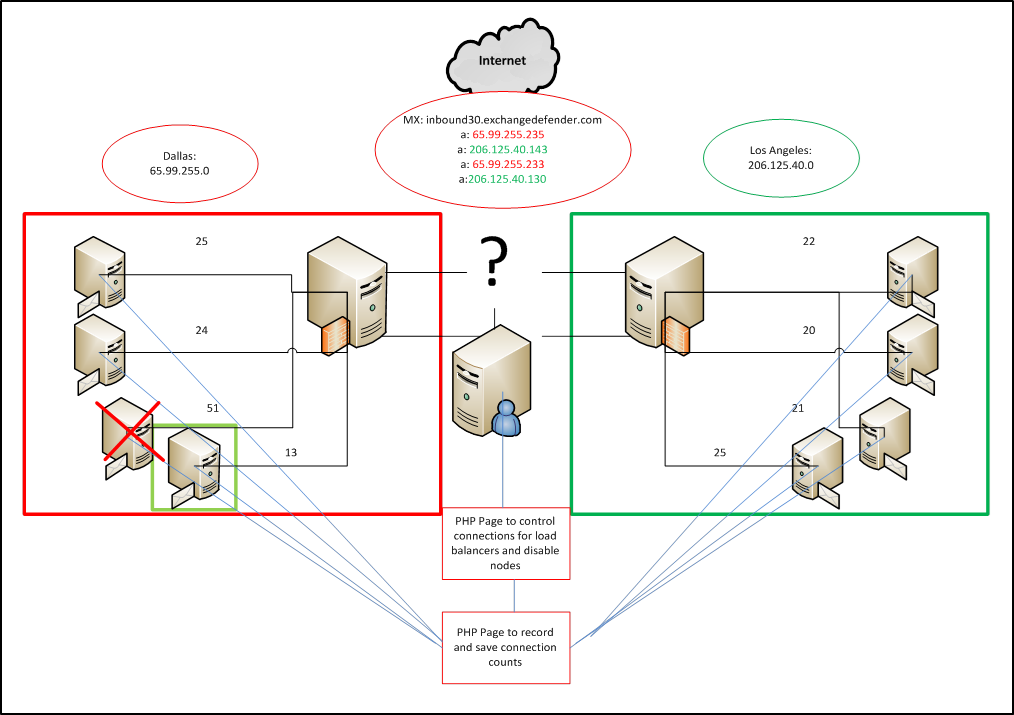
In non-code terms, we now calculate the number of servers in each site (DC). If there are more than half of the servers offline in a site, the load balancer will no longer shut off new node connections. If the current node connection count is either greater than the high threshold or has 50 active connections above the average connection count of servers in the site then it will shut off the node.
The End Result
After implementing the new load balancer algorithm we saw drastic improvements of balanced connections and delivery times for inbound messages. The most notable improvement took place on September 10th where we processed 2.8 million messages and we saw minuscule delays across the board and received zero complaints about deliver delays.
Travis Sheldon
VP Network Operations, ExchangeDefender
(877) 546-0316 x757
travis@ownwebnow.com
Tips For Handling The Four Most Common Questions And Objections About ExchangeDefender’s Hosted Exchange

We want all of our partners to be successful. Over the years we have worked with many thousands of partners, some who have sold a lot of our products and at least as many who haven’t sold many…or any at all. Just as you’re interested in the differences between the clients who spend and those who don’t, we’re very interested in why some partners consistently close new business and some don’t. The experience of many years and many partners illuminates important patterns, trends, and some critical lessons about how those who succeed at selling Hosted Exchange are doing so.
In other words, we have learned a couple of things from you, our partners, about how to sell our own solutions, and we realize that sharing these lessons might help more partners find more success.
First, the same questions and objections seem to pop up time and again. Second, the way that you as the VAR or MSP address them can mean the difference between “don’t call us, we’ll call you” and “where do I sign?” Here we humbly present the four most common questions or objections about ExchangeDefender’s Hosted Exchange 2010 + SharePoint 2010, and some advice for how to turn these objections into more reasons for the client to say yes today.
1) Why should I get this?
This one’s pretty interesting, because the answer should have been made clear in your presentation that showed how ExchangeDefender’s Hosted Exchange 2010 + SharePoint 2010 addresses their business issues or challenges. For example, downtime and support costs when email goes down are common issues that the solution addresses, so the reason that a business with downtime problems should get it would be to reduce downtime and the costs for email, and take that worry or cost off their mind and their books. The answer will differ for every business of course, but it will lye in the benefits that ExchangeDefender’s Hosted Exchange 2010 + SharePoint 2010 will provide them.
2) How is this different from what I’ve got?
Rather than actually pulling a “Ben Franklin” here, breaking down a line by line comparison of our solution versus their current solution, what you really want to do is go back to a key problem or issue that they told you about, and pick a feature or benefit comparison to highlight. Discuss a point where their current solution is falling a little short, or is maybe too expensive, or is unnecessarily complicated for what the business needs, and then focus on some differences there relative to what makes ExchangeDefender’s Hosted Exchange 2010 + SharePoint 2010 the better solution for the business.
3) How does this compare to the other really cheap thing?
It depends on specifically what the other really cheap thing is, but what you want to do with this one is focus on the value of a business-class solution. The free or really cheap hosted email alternatives out there are usually not designed for a business, or are designed with very limited features. Maybe there’s no support, maybe there are compatibility issues with other things running in the environment, no guarantees or recovery options in the event of a disaster. The point is that cheap does not always equal better. A business needs a business class solution, especially a business that depends on its email to run.
4) I don’t have that big a problem and it seems like a lot of money.
A question like this is an indicator that there’s been a breakdown somewhere along the way in the value escalation process. Your job is to help the client connect the dots, to see exactly how ExchangeDefender’s Hosted Exchange 2010 + SharePoint 2010 will help make their lives and business better, and if you go through all of that in your discovery and presentation process, and then get this question afterward, you clearly lost them somewhere. The dots aren’t really connected, so the answer to this question should involve going back and re-affirming the client’s biggest challenges and the connections.
If you hear that it seems like a lot of money, that’s just another way of saying that the value they see in the solution doesn’t offset what it’s going to cost them to get it, so you need to go back and remind them, build up some more of those benefits.
Do you find this information useful?

If you would like a lot more in-depth discussion about the cloud and how it affects you and your clients, visit Looks Cloudy http://www.lookscloudy.com where I blog daily about the adoption of the cloud in SMB, conduct live webcasts and podcasts with industry leaders and more.
Sincerely,
Kate Hunt
VP Community Development, ExchangeDefender
kate@ownwebnow.com
(877) 546-0316 x777
ExchangeDefender Executive Podcast
Important: This is something new and just like with everything 1.0 we need your feedback. Give it a listen and please fill out the survey:
ExchangeDefender Executive Podcast is a short, 10 minute recording meant to sum up a week worth of news and developments across our products and services. As we get bigger and you become more successful, time becomes very scarce and nobody can afford to miss out – so we figured a short podcast that you can listen to in your car on your way to work or on your way to the client would fit the bill for folks that don’t have the time to read half a dozen blog posts, hour long webinars or training throughout the week. So here is the first one:
Download ExchangeDefender Executive Podcast #1 (mp3, 9 Mb)
We hope this gives our busy partners a way to stay in the loop. While it’s not as detailed or as worthwhile as the blog posts and longer webinars we offer on our blog, I hope this is a great investment of time for those of you who have various staff that needs to stay on top of what your coolest vendor is doing.
Give it a listen and please fill out the survey. Have a great week!
Sincerely,
Vlad Mazek, MCSE
CEO, Own Web Now Corp
vlad@ownwebnow.com
(877) 546-0316 x500
(407) 536-VLAD
Improving the Compliance Archive Core
This week has been dedicated to improving the core mechanics behind our Exchange Defender Compliance Archive software and increasing the functionality it offers. This product was originally designed over two years ago, with limited functionality. This product has definitely been one of the more challenging software platforms to design and implement on a large scale. However, it’s been a very enjoyable program to design and launch. This week has been very productive and we have got a lot of new features and new tools to talk about!
· Misc. rending issues have been resolved.
· Elevated domain level access.
· Message download (.msg format).
· Import Tool ( Still being developed )
One of the biggest challenges when creating front-end GUI browser software is getting things to look and respond the same way across several browser platforms. It seems (chrome, Mozilla, opera, IE) all have their own recipe when it comes to rendering different component. One of the first issues we addressed this week was minor rending issues, increased performance and logic loops for displaying messages in the browser. None of these were huge issues, but an eye sore none the less.
We’ve had this request for a while and we finally implemented (Elevated Domain-Level Searching). This new feature allows domain admins to examine messages inside any user’s mailbox that is within the selected domain. Using this feature, you have full control inside of that mailbox just as if you were signed into that compliance mailbox. However, there is currently no way to wildcard search all mailboxes within the same domain at the same time. The processing load that would generate would be tremendous and would not be a pleasant searching experience.
One of the more elaborate features, (at least behind the scenes) is message downloading. In the past you could download messages in .eml format, which left a lot to be desired. Well, we’ve changed that this week. Now when you request a message download, it will generate the file in .msg format! Looking at this from a developer’s perspective and for anyone who has ever worked with Microsoft.Office.Interop.Outlook controls will understand the heartache in this area of development. The control exposes a lot of information, if you just want to look at elements and examine a message contents. However, the second you want to use the component to perform any useful operations that’s when it becomes a challenge.
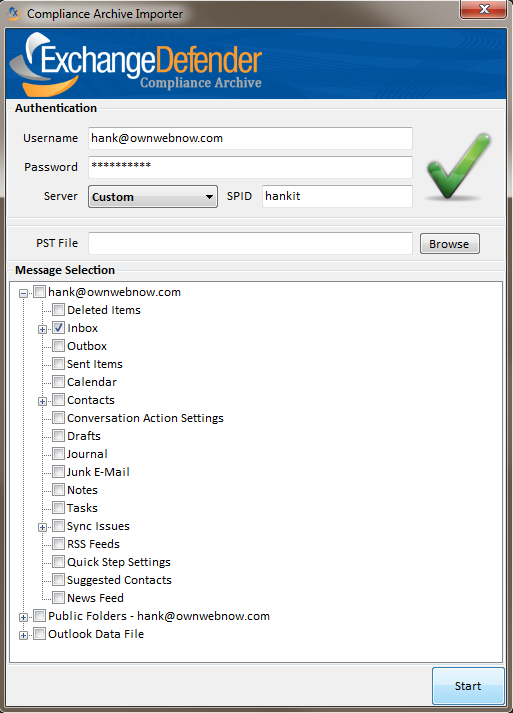
The last and most important area of concern was importing mailboxes into the compliance system. This is something we’ve been working on and it should be ready in a few weeks. We’ve made a tremendous amount of progress with this tool and are very excited for its launch. When designing this tool, we’ve put message integrity at the top of the list. Some of the concerns we had about this software was handling duplicate messages and keeping them from being inserted into the archive mailbox. We also added the ability to handle program/internet crashes while messages are being imported and the ability to resume the import process.
Hank Newman
VP Development, ExchangeDefender
hank@ownwebnow.com
ExchangeDefender Enhances Dynamic HTML Content Filtering and more…

This week I’ll be recapping some issues that may have affected multiple clients in the past week within the ExchangeDefender realm of our portfolio. Before I get to those items, I’d like to take this time to thank some of our partners who were extremely helpful and truly honor up to the title of partner. A couple of these issues required client side testing that we would not be able to emulate as they involved third party transactions and notifications.
The first multi-client issue we resolved last week was a content filtering issue. We received a couple of reports that ticket updates from one of the major PSA vendors were getting pretty mangled by our filtering, we had a couple of partners step up with excellent samples in .msg format, that allowed me to dive into the message content and header information to track down what portion of our filter was causing the issue.
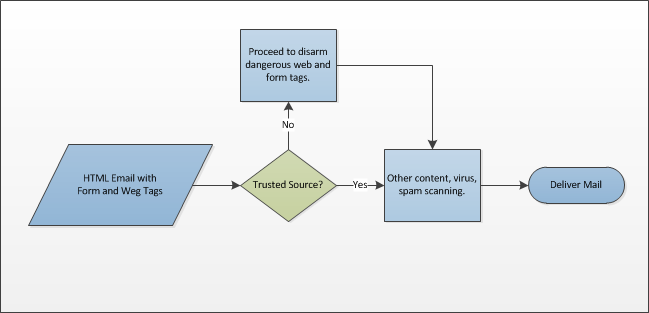
Basically, as technology continues to grow and migrate more towards email as the primary method of communication, email content itself is becoming more rich and interactive. In the past, emails with form tags and rich html were often phishing scams, but in this case it was a significant amount of mail flow from a reputable source to probably a large portion of our client base. In order, to resolve the issue we basically turned the filtering dynamic from a flat (almost boolean) logic to a very dynamic, multi-level, per domain/ip policies. Thankfully, one of our partners was able to provide documentation from their PSA vendor that provided whitelisting guidelines. Once we received that, we were able to move forward, and make a portion of filtering that has been pretty rigid in the past into something more dynamic and flexible to reflect current email content. Please see the basic layout of the new web tag workflow:
The second issue we tackled involved our Encryption service’s feature that allows folks to reply to an encrypted message directly from the portal in an encrypted manner. Currently, on our primary smart host we use a very strict anti-spoofing measure that does not allow folks to relay as “from” a wide variety of free mail services. We had to put this measure in place to improve overall mail reputation and we’ve seen marvelous results so those changes will always remain in place. However, we hit a road block when someone from one of these free mail services attempted to relay an encrypted message because our anti-spoofing measures would not accept the messages in their current format.
The solution lied in having PHP use an alternate route to deliver messages generated by this script only, without altering the SMTP configuration. So after digging through pages and pages of configuration notes for the mail() function in php, I kept finding that you can pass “other parameters” to your SMTP process within the command. However, I only found folks had successfully used it in the past to rewrite the “from:” address, which we were already doing successfully.
Apparently what folks failed to mention is that what the “additional parameter” is doing is just appending your arguments at the end of the SMTP command defined in your php.ini file. Once you reach that point, you basically can run a different SMTP configuration for any script on demand instead of just blindly relying on whatever smarthost the server is running. To make the rest of this story short, folks using free mail services can now reply to Encryption messages within the portal without any issues.
Here are some tips:
1. Before submitting and subsequently waiting on a ticket, please take a look at the Knowledge Base inside of the portal. We’ve recently consolidated a large amount of information from our previous help blogs to make sure everything we’ve made available, can be viewed in one location. We’ll be taking a look at outdated items over the next week to make this a very valuable resource.
2. Rely on the portal. https://support.ownwebnow.com is where we are available 24/7. Remember there’s no such thing as too much information, but there is such a thing as not enough information. To avoid back and forth interactions, always error on the side of too much information it will always save you time.
Carlos Lascano
VP Support Services, ExchangeDefender
carlos@ownwebnow.com
(877) 546-0316 x737
ExchangeDefender Q4 Webcast on Thursday
I have to admit, I’m very excited about the Q4 webinar on Thursday. It looks like this will be our best attended webcast of the year and I’ve got a ton of stuff to present, explain, position and help you make money with. The profit structure of the MSP space has been changing rapidly so come see how OWN partners stay ahead of the curve and beat out the likes of Microsoft and Google when it comes to closing.
Seating is limited but if you register you will be able to watch the webinar recording at your convenience.
ExchangeDefender Q4 Webinar
Thursday, October 27, at Noon EST
Here is a brief summary of what we’ll cover:
– Brand new web site with all of our products and services on one site
– Realtime Network Operations Center that keeps you in the loop
– Launch of our new ExchangeDefender Compliance Archive email solution
– Geographic redundancy for all ExchangeDefender services
– Launch of LiveArchive 3 in Dallas and Los Angeles
– Enhanced integrations with Kaseya, LPI, nAble, GFI Max, Quotewerks, etc
Other Items
We’re starting to open up our 2012 roadmap and we’re really looking for feedback. ExchangeDefender Gold program is underway and some of you have started receiving calls from my management – help them help you. If you’d like to talk to me directly and don’t want to hit my cell phone, I will be at the HTG / Preday / ConnectWise event and have an open schedule, claim a spot:
ConnectWise IT Nation + HTG Appointment Request
http://www.surveymonkey.com/s/QPL9NZB
Beyond that, we’ve really kicked up the blogging on here to the next level. There is new content on nearly daily basis and we’re getting amazing feedback from our partners so we’re going to keep at it. This is typically more detailed stuff than you’ll ever get from me but that’s the point, if you want to stay in touch and be in the know now you can. Here are some of the posts from the last week:
How to position and sell Exchange messaging
ExchangeDefender Redundancy: Technical Implementation Details
Exchange 2010 + SharePoint 2010 vs. Exchange 2010 Essentials
Introducing Geographic Redundancy to ExchangeDefender Services
The Persuasive Power of Discounts and Trials
Shockey Monkey & Keeping It Clean
The Persuasive Power of Discounts and Trials
Upselling Downtime–How to Properly Position Business Continuity
My staff spends far more time, collectively, with you than I ever can and they are experts at their pieces. What you read here is not just their opinion, these are the best practices we pick up in the field working with you day-to-day. Best of all, you can read it anywhere, anytime – no need to wait for a conference, no need to sit through a long webinar and you can easily forward it to the appropriate people in your company. We hear success stories about how these articles have already made a difference in our partners sales staff and marketing, not to mention given folks that interact with the services on a technical level a much better understanding of how these products behave on the very basic level.
Talk to you tomorrow, I look forward to it!
Sincerely,
Vlad Mazek, MCSE
CEO, ExchangeDefender
(407) 536-VLAD
Upselling Downtime–How to Properly Position Business Continuity
Let’s just face it – downtime happens. In the past three months almost every major cloudy service, from Microsoft Office 365 to BlackBerry, Amazon Web Services, the Sony Playstation Network, and Netflix, has suffered an outage for one reason or another. There’s no reason to try to hide this reality when you try to sell hosted solutions to your clients. It makes more sense to set an accurate expectation that a reasonable amount of downtime is to be expected, then to help them decide whether they can accept it or what they could do about it. It’s a bit like “under promise and over deliver” with a twist, and it can often help you to upsell a higher value solution.
Costs and Benefits
 Purchase decisions are all about a cost/benefit comparison, and always will be. What clients seek when making cost/benefit comparisons is very simple: good enough. Most want neither the bottom of the barrel, nor the top of the line, but a solution somewhere in the middle that addresses their core needs at a reasonable price. As your client’s Trusted Technology Advisors, you get to give that “Goldilocks advice”—what’s too little, what’s too much, and what’s just right.
Often email and messaging are among the most important services to a business, tools they depend on every day. With hosted messaging solutions from ExchangeDefender, you can help to protect your clients from suffering downtime their business can’t afford. Downtime can be the key to upselling a client from Exchange 2010 Essentials to Exchange 2010 + SharePoint 2010. It’s just a matter of finding out what’s “good enough.”
The Power of Good Enough
 In many cases clients are willing to trade off a few features or accept a lower service level for the benefit of a lower price, but only to a point. The question becomes: how important is email to the client’s business? How much downtime can they afford? An hour? A day? Can that client justify the cost of guaranteeing that their email will always be available?
If the possibility of an occasional bout of downtime isn’t the end of the world to the client, and they really just need a secure email-and-only-email solution, then Exchange Essentials 2010 is the right fit. With a cost difference of a mere $4 per mailbox per month, though, it can be quite easy to upsell the LiveArchive feature of Exchange 2010 + SharePoint 2010 to those clients who cringe at the thought of prolonged downtime.
With Exchange 2010 + SharePoint 2010 from ExchangeDefender, the Live Archive service is always on, constantly archiving sent and received mail so there is no maintenance or management to worry about in case of an outage. So let’s say the power goes out at the client’s office. With Live Archive, all those users have to do is go home and log on to their secure Outlook Web Access portal and pick up work right where they left off. The cost of the outage just dropped to almost nothing.
Help to protect your clients from downtime they can’t afford by setting accurate expectations about the reality of downtime, and by offering them the right ExchangeDefender solution to meet their real needs.
Do you find this information useful?
If you’d like a lot more in-depth discussion about the cloud and how it affects you and your clients, visit Looks Cloudy http://www.lookscloudy.com where I blog daily about the adoption of the cloud in SMB, conduct live webcasts and podcasts with industry leaders and more.

Sincerely,
Kate Hunt
VP Community Development, ExchangeDefender
kate@ownwebnow.com
(877) 546-0316 x777