




XDSYNC & Password Sync–Coming This Week!
This past week we have revisited a piece of software that was originally written over two years ago. Since our initial launch of XDSYNC back in 2009, it has become a widely used application among our partners. For those who may not be familiar with XDSYNC and what it does, let me explain.
XDSYNC is a service that you install on your local Exchange Server for accounts you wish to have protected by ExchangeDefender. The application monitors the structure of Active Directory & Mail Users and automatically provisions existing and newly created accounts into the backend system of ExchangeDefender. This allows an almost hands free experience for our partners when it comes to managing additions and removals inside of an organization.
Over the years one of the biggest requests has been for two additional components to this software. The first request was to have the ability to restrict/block an account on the server from being included in the automatic provision list. The second request was to implement a way to synchronize passwords between ExchangeDefender and the remote Exchange server. These requests have finally come to surface in our newest release of XDSYNC!

Exclusion List
The exclusion list is very straight forward. Upon configuration of XDSYNC you will notice an additional tab within the software. This tab will be populated with the current list of mail users on the Exchange Server. You simply check any accounts you wish for the software to ignore from the processing component and they will not be sent to Exchange Defender.
Password Sync
This process is currently being designed in a single direction due to limitations within the Windows environment. Initially it will not touch any existing users that existed before installation. The password change event will be triggered upon a password change request within ExchangeDefender.
For Example:
· Either an admin or users changes the password on “test@yourdomain.com”.
· This account is now flagged for “Password Sync”, if enabled.
· The next time XDSYNC pings for changes, it will be included on the list.
· The change gets processed and the password is updated on the Exchange server.
You may also notice from the screenshot we have included a “Notifications” section. This will allow you to enable and configure a recipient to be notified each time an account is either added/removed from ExchangeDefender via XDSYNC.
We are very excited to release this new version as it takes advantage of many code advancements and should operate at much higher level of performance than the previous version. Good news is that the new version is currently undergoing testing and should be released Friday of this week!
Hank Newman
VP Development, ExchangeDefender
hank@ownwebnow.com
Marketing is All About Planning!
 Here is a quick Marketing tip about the importance of planning! The objective of great marketing is creating something today that will bring you success in the future. The key to that is good PLANNING!
Marketing is the glitz and glamour and creative side of business, right? Most of the time, yes, but other times it is what sets a company up for future success or failure. Let me give you an example, let’s say that there is a new book written about how to use current Social networking sites: Facebook , Twitter, LinkedIn, etc. The marketing campaign for the new book could have been amazing, book signings, billboards, commercials, you name it… However, with the public becoming more and more technically savvy, social networking sites and communities are changing almost daily. Once a book is written and published it is stagnant. The information contained within its’ covers is in the past and cannot be updated. Therefore, the sales of a book like this will likely be terrible. No one wants to read something that will no longer be true next week.
Take this lesson of poor planning and put it into your business. Business owners that don’t plan ahead are constantly playing catch-up with their competitors that are better prepared and proactive. Stop that from happening to you. You can be the leader!
Devote some valuable time really planning ahead exactly what you want your business to look like and the message that you send out to your prospective clients. Set aside some time to plan out what you want to achieve, sales goals, new products or services, etc., and build marketing campaigns around those goals and you will see that you are much more efficient and proactive. Goals set guidelines and guidelines provide structure. It is so much easier to be organized and stay on point when structure is in place. However, leave some room for creativity!!! Don’t just plan for next week or next month, but strive to look on a grander scale to a year and beyond.
Remember, success is about setting goals and having a plan and strategy to get there! Good luck!
Stephanie Hasenour
VP Marketing, ExchangeDefender
stephanie@ownwebnow.com
LiveArchive from ExchangeDefender
Whatever your clients’ needs are, you can get your foot in the door and start building a strong relationship (or deepen an existing one) with the powerful combination of Hosted Exchange 2010 + SharePoint 2010 and Exchange 2010 Essentials from ExchangeDefender. Now you can offer your clients an attractive combination of rich features, affordability, security and flexibility on our globally-redundant infrastructure that even most large enterprises cannot build in-house.
One of the most powerful – and least understood – features in the ExchangeDefender suite is the Live Archive service. If the possibility of an occasional bout of downtime isn’t the end of the world to the client, and they really just need a secure email-and-only-email solution, then Exchange Essentials 2010 is probably the right fit. With a cost difference of a mere $4 per mailbox per month, though, it can be quite easy to upsell the Live Archive feature of Exchange 2010 + SharePoint 2010 to those clients whose bottom line is threatened by email downtime.
The LiveArchive service is always on to ensure that no matter what, whether your email server crashes or the power goes out in the office, users will always be able to access critical email and stay productive in case of anything. Using ExchangeDefender’s secure standby servers, up to a year’s worth of inbound and outbound email is available and actionable through Outlook Web Access at all times.
LiveArchive is one of the industry’s best-kept-secret Awesome Deals. It’s always on, powered by Exchange 2010 across two data centers, archives sent and received mail, and users never have to deal with training, management, maintenance, or software installation. Why is it a best-kept-secret Awesome Deal? Because LiveArchive – and the ability for users to resume work right where they left off no matter what happens – is included with every ExchangeDefender account. It’s astonishing to realize that other email providers charge as much as $49 per user just to be able to keep working in the event of a technical glitch or outage.
Do you find this information useful?
If you’d like a lot more in-depth discussion about the cloud and how it affects you and your clients, visit Looks Cloudy http://www.lookscloudy.com where I blog daily about the adoption of the cloud in SMB, conduct live webcasts and podcasts with industry leaders, and more.
Kate Hunt
VP Community Development, ExchangeDefender
kate@ownwebnow.com
(877) 546-0316 x777
Exchange 2010 Essentials from ExchangeDefender: Costs & Benefits
 Purchase decisions are all about a cost/benefit comparison, and always will be. What clients seek when making cost/benefit comparisons is very simple: good enough. Most want neither the bottom of the barrel, nor the top of the line, but a solution somewhere in the middle that addresses their core needs at a reasonable price. As your client’s VAR or MSP Trusted Technology Advisors, you get to give that “Goldilocks advice”—what’s too little, what’s too much, and what’s just right.
Often email and messaging are among the most important services to a business, tools they depend on every day. Just the same, in many cases these business clients of ours are willing to trade off a few features or accept a lower service level for the benefit of a lower price, but only to a point. The question becomes: how important is email to the client’s business? How much downtime can they afford? An hour? A day? Can that client justify the cost of guaranteeing that their email will always be available?
Some SMB clients don’t want or need a full-featured messaging and collaboration solution and want to minimize their costs of maintaining basic functionality. While Google Apps for Business offers an attractive price point with “pared down” messaging features, its unfamiliar interface may turn off folks who are comfortable with the Microsoft user experience. Exchange 2010 Essentials delivers the best of both worlds – minimal complexity using Outlook Web Access protected by ExchangeDefender Essentials along with the ever-popular Public Folders and Distribution Groups at a competitive price point, just $6 per month per mailbox. Clients can even integrate with their existing copies of Outlook to get that fat client experience they know and love.
Help to protect your valuable client relationships by offering them the right ExchangeDefender solution to meet their real needs.
Do you find this information useful?
 If you’d like a lot more in-depth discussion about the cloud and how it affects you and your clients, visit Looks Cloudy http://www.lookscloudy.com where I blog daily about the adoption of the cloud in SMB, conduct live webcasts and podcasts with industry leaders, and more.
Kate Hunt
VP Community Development, ExchangeDefender
kate@ownwebnow.com
(877) 546-0316 x777
Business Slowing Down For the Holiday Season? How to Make It Productive and Profitable…
It’s the holidays, and things seem to have slowed down. It’s not that there isn’t anything to write about (there’s plenty), it’s that a bunch of folks are “checked out” mentally (or physically or both) for the season and there’s not as much going on as usual.
Many of our clients are probably in “vacation mode” now, too. Some of their employees and customers are Out, too. The phones are quieter. The service board seems empty. It can be tempting to slow or halt our own operations in response to this, but these quiet periods do not constitute an excuse for us to check out as well. In fact, choosing to follow suit on this one could be quite costly.
Think about it this way: when clients’ businesses are slower, they’ve got that much more time and bandwidth to sit down and have meaningful conversations with their Trusted Technology Advisor. Conversations which, when properly leveraged, can translate into real business gains for them and profitable work for us.
When are we most likely to get the time and attention of a busy CEO? Assuming that person is not out already, this is it. That busy prospect decision maker just might be able to carve out a few extra minutes during this time when they have less of the normal “day-to-day” to deal with.
The smart MSPs are kicking sales and marketing efforts into high gear while many others seem to be resting. The team probably has more downtime than is normal, as well.
Get on the phones, schedule those meetings, write up the reports, then get out there and Sell, Sell, Sell.
Do you find this information useful?
If you’d like a lot more in-depth discussion about the cloud and how it affects you and your clients, visit Looks Cloudy http://www.lookscloudy.com where I blog daily about the adoption of the cloud in SMB, conduct live webcasts and podcasts with industry leaders and more.
Kate Hunt
VP Community Development, ExchangeDefender
kate@ownwebnow.com
(877) 546-0316 x777
Where is My Mail Flow?
We’re going to take it back to the basics, because as we grow, we get new batches of partners which in turn comes with a new batch of tech support staff. And let’s face it, their knowledge of mail flow can vary from the guy that can write his own sendmail/postfix custom scripts, to the guy that just had great upbeat personality that most of tech folks lack. So… here we go.
There you are minding your business, possibly catching up on your company allowed tech blogs then your phone lines explode and you hear the dreaded words “We have not received any mail in the past “x” hours!! FIX THIS NOW”! Here at ExchangeDefender, this is easy to handle and you don’t need to call anyone, you don’t need to open and wait for a ticket for 99% of the scenarios.
Step 1
Check the mx record.
From windows:
nslookup -type=mx domain.comFrom linux:
dig mx domain.comFrom the web:
http://www.mxtoolbox.com/The one and only result you should get back is:
inbound30.exchangedefender.com
If you have anything else in there, and you’ve been getting complaints about random mail not arriving, the odds are great that they arrived at the alternative location and got bounced because of IP restrictions. But let’s not get sidetracked.
If there was no mx record in place, that’s your problem. Contact your client’s DNS provider and get inbound30.exchangedefender.com added ASAP. If inbound30 is the one and only record in place, go to step 2.
Step 2
Send a test message from a non ExchangeDefender domain. Here’s why, we route all outbound mail directly to the mail for processing speed so it won’t show up on your client’s mail log, but yours. Once you’ve sent your test message you want to note the from and to address and go to Step 3.
Step 3
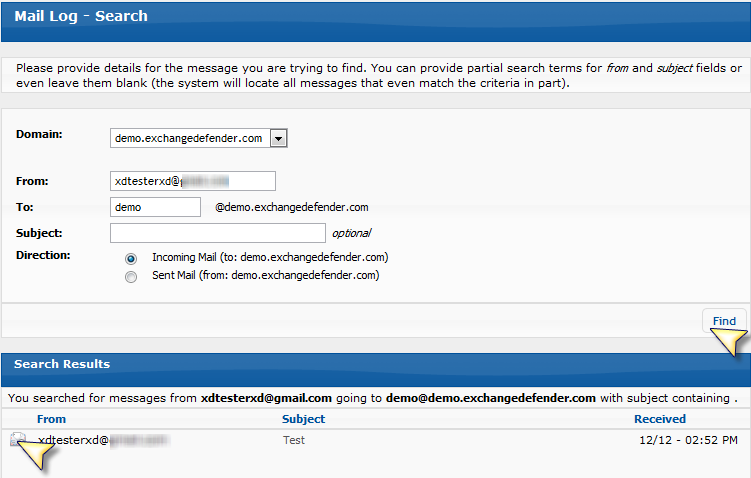
Log into https://admin.exchangedefender.com with your Service Provider ID (Hint: it’s not a domain or an email address). Once you’ve logged in, click on Mail Log. Now you can search the Mail Log for your client for the very message you tested with and your answer will be at your finger tips.
You will see a line by line log of the SMTP transaction the most important one being the last one to your delivery IP. Generally, it will tell you exactly what the problem is, ranging from your ISP blocking the port, or a new tech blocking the port from us, or the email server running low on resources it’s all right there.
Blue – The recipient servers and the status returned, if it starts with a 2 it was accepted, if it starts with a 4 it was deferred, if it starts with a 5 it was permanently rejected.
Green – If it was accepted and your end user says they don’t see it. You can search the mail logs on that server for the message ID. (odds are there’s a rule in place if you get this far.)


Carlos Lascano
VP Support Services, ExchangeDefender
carlos@ownwebnow.com
(877) 546-0316 x737
The Value of “Value”

Value is a word that carries many meanings among many people. According to dictionary.com value is defined as:
“Monetary worth, importance, the worth of something in terms of the amount of other things for which it can be exchanged or in terms of some medium of exchange.”
However, “value” in a marketing sense is expressing the benefit in your offering and you should strive for value to be the number one goal for your business to get across to your potential clients. This quick marketing tip can help you produce amazing results on an ongoing basis.
At ExchangeDefender, we are adamant about the importance of pumping as much value into your products or services as possible. The marketplace is fed up with always seeing the normal or average products and services. Thus, when a product or service comes along that exudes great value; they LOVE it and feel as if they got to HAVE it.
This also goes along with a statement that is important to remember: “There is no business on the earth that will buy a solution for a problem that they don’t have.” Yet, most marketers and businesses jump right into features without taking the time to fully understand if the people that they are trying to market to believe that they even have a problem to begin with. Thus, the marketing challenge at hand turns into a whole new task: “sell the problem”.
This creates an interesting oxymoron. Most people aren’t willing to acknowledge that they even have a problem unless they also believe that there is a solution to the problem. So a huge part of selling a problem is hinting that there’s a solution that others are using. The key part about that is letting them know that the solution they will ultimately need or be looking for is YOU! This is accomplished by marketing the VALUE and benefits of your solution and presenting it in a manner that allows them to see the solutions to the problem at hand.
How to Add Value to Your Offering?
One way you can increase the value of your offering, is to lower your prices or fees associated with your product of service. While this method can be effective, it can also drag you down into a price war. Another reason to stay away from this option is that many people that are attracted solely to low prices, are the most likely to leave and change providers as soon as another company beats your price; and that is exactly what you are trying to stay away from. In my opinion, it’s far better to find ways to pack a ton of value into your product and sell your offering for a great “value for the money” price, rather than to offer an average product and sell it cheap.
How ExchangeDefender Offers YOU Value
At ExchangeDefender we help our partners to offer VALUE in the most simplistic ways. For example:
· All of our products and services are all-inclusive. This packaging structure makes it easy for you to offer your clients services that contain a lot of VALUE to them, but yet you are not being nickel and dimed for every feature. This way you can focus on what is most important to your clients and be able to offer it to them, thus becoming the solution to their problem without the additional cost associated with it.
· There are no minimums with our services, no contracts, no additional fees. Whether you have 1 or 100 users, you can use our solutions. This allows us to cater to businesses of all shapes and sizes to offer them solutions that can help to make them profitable.
· We offer marketing collateral and proven best practices. We believe and know for a fact that you are busy! As are we, so we make marketing collateral available for partners to use for their clients so that they can focus on the business rather that how to sell it. This creates value because it is one less thing that you have to do. Also, we have a wealth of knowledge that has been documented from our partners success with offering ExchangeDefender’s services. These profitability best practices are great ways to get ideas on how to market services to your clients and maintain profitable relationships with them with the help of us here at ExchangeDefender.
· We don’t compete with you. We work with you to make a sale by offering you a solution set that will be of value to your clients and provide support of those services.
· We are available 24x7x365! We have support via the phone and through are ticketing system to be here to support you and make our partnership successful.
There are many more examples of the value that we offer our partners and help them to embrace the cloud.
Ultimately, the marketplace is attracted to VALUE – The bigger the value, the more attracted a customer will become. By making your product offering as valuable as possible, you will never have to rely solely on selling based on price again!
If there is anything that we can help you with, please feel free to let me know!
Stephanie Hasenour
VP Marketing, ExchangeDefender
stephanie@ownwebnow.com
LESS is MORE…
 Many small to medium-sized businesses rely heavily on marketing tips and advice that they can get for free from the Internet; at least in the early years of their business. While this is fine and dandy, your business’s marketing efforts need to be specific and catered to what matters most to your target market and to your current customers. So, I have a few quick tips for you which I think will help you get a better response rate from all your marketing efforts. To increase the success of your mailing campaigns, advertising, email marketing and the number of leads you get from your website or events, when marketing to clients:
“Use the least amount of words as you can to get your message across! Less is More!”
Here are 2 reasons why, with marketing, LESS is MORE:
#1: When you use as few words as possible, you will be removing all of the extra “stuff and fluff” and keep only the key points of your marketing message highlighted. This will, in turn, make your message clear, more focused and easier for the reader to understand what you want them to know or do in a timely manner.
#2: Just like you and your business, the people coming in contact with your marketing are BUSY! When someone reads a piece of marketing collateral or sees an advertisement, they do a quick scan of it. If it looks too long right off the bat, many people will decide not to even invest the time required to read through it.
A GREAT acronym to remember when creating marketing is K.I.S.S.! 
K – Keep
I – It
S – Simple &
S – Straightforward
How does ExchangeDefender “K.I.S.S.”?
At ExchangeDefender, we keep our marketing simple and straightforward in a variety of ways. First, we have identified our niche and our target market. Second, our product line is very specific, easy to understand, and we market the features that our partners are most interested in. Third, we don’t hide anything; all of our services come packaged all-inclusive to create more profitable offerings for our partners. Lastly, we tell partners what they need to know to have a better more successful partnership with us.
When marketing becomes clear, more focused AND more people actually read the whole message that you are trying to relay – you significantly increase the potential of your efforts! “K.I.S.S.” is a great way to leverage your marketing to be sure that your client base is receiving the information that you want them to get in an easy fashion for all parties. Also, it is also great to incorporate a call to action with your marketing message so that the customer will know what to do with the information that they are reading, thus also creating a quicker result from your marketing.
Stephanie Hasenour
VP Marketing, ExchangeDefender
stephanie@ownwebnow.com
(877) 546-0316 x735
3 ExchangeDefender Features to be Thankful For…
Most of us have taken at least some time off during the Thanksgiving holiday week, to relax with friends and family, overeat, and over shop. It’s all in the name of the grand American tradition. But before we all shift into a lower gear (hopefully) and reflect on what we’re giving thanks for this season, let’s take a moment to consider a few unique features of ExchangeDefender that might qualify for the list.
Here are just three of ExchangeDefender’s great features and why we’re thankful to have them every day:
Web File Sharing
Whether ExchangeDefender protects your own Exchange server or a Hosted Exchange 2010 + SharePoint 2010 account with us, the web file share library is built in to every user account. The web share library makes it easy and safe to share important documents, photos, videos, and more over the web without having to worry about whether they’ll get there or if they’ll be secure, or deal with the complexity of a separate subscription and license from another provider.
We’re thankful for this feature because most of us despise spending valuable time messing with large or grouped email attachments, and are quite happy never to have to do it again. As the information we want to share grows in size and “richness,” the scalability and flexibility of ExchangeDefender Web File Sharing are just what users need, and the simplicity can’t be beat – there’s no need to manage any additional subscriptions, fees or licenses, but Web File Sharing is always available.
LiveArchive
The LiveArchive service is always on to ensure that no matter what, whether your email server crashes or the power goes out in the office, users will always be able to access critical email and stay productive in case of anything. Using ExchangeDefender’s secure standby servers, up to a year’s worth of inbound and outbound email is available and actionable through Outlook Web Access at all times.
We’re thankful for LiveArchive because it’s one of the industry’s, best-kept-secret, Awesome Deals. It’s always on, powered by Exchange 2010 across two data centers, archives sent and received mail, and users never have to deal with training, management, maintenance, or software installation. Why is it a best-kept-secret Awesome Deal? Because LiveArchive – and the ability to resume work right where you left off no matter what happens – is included with every ExchangeDefender account. It’s astonishing to realize that other email providers charge as much as $49 per user just to be able to keep working in the event of a technical glitch or outage.
Message Encryption
ExchangeDefender Message Encryption provides a free and transparent encryption mechanism that enables businesses to quickly comply with SOX, HIPAA, SEC and local government requirements for personal information encryption. Create global encryption policy for domains or email addresses, and instantly encrypt specific messages without policy rule management. ExchangeDefender Message Encryption extends business security beyond the usual technical constraints without management headaches, software installations, or additional fees.
We’re thankful for Message Encryption for a lot of reasons, not the least of which is the simplicity it delivers for regulatory compliance. While we also offer a Compliance Archive solution as a stand-along service as well, the Message Encryption feature satisfies some important privacy requirements. Unlike other email and security providers who charge add-on fees upwards of $10 per month per mailbox for message encryption services, ExchangeDefender includes both On Demand and policy-based encryption functionality with every account. This is really what we’re grateful for, because it’s such a huge opportunity for the markup, to build a healthy margin into the resale.
So on that note, I hope you had the happiest of Thanksgiving holidays.
Do you find this information useful?
If you’d like a lot more in-depth discussion about the cloud and how it affects you and your clients, visit Looks Cloudy http://www.lookscloudy.com where I blog daily about the adoption of the cloud in SMB, conduct live webcasts and podcasts with industry leaders and more.

Kate Hunt
VP Community Development, ExchangeDefender
kate@ownwebnow.com
(877) 546-0316 x777
Happy Thanksgiving!
From all of us at ExchangeDefender, we wish you a very Happy Thanksgiving!

Sincerely,
The ExchangeDefender Team 