



Finding Your Niche to Create New Business
 Most IT businesses are started by technical people that branch out on their own in search of creating a successful business, but more to do what they love. This passion for the industry can sometimes be overshadowed by the day-to-day ins and outs of running a business. Finding new business is one of the hardest parts of running an IT solution company and can cause many tech minded individuals to struggle even after they are well established.
Carving out a niche is a good way to create repeatable new business. This can be accomplished in several ways.
Find your Specialization
This may be a specific platform you are good at, software or hardware solution specializations provide ways to differentiate you and allow you to focus your marketing efforts.
Learn a Vertical
Getting familiar with a specific vertical can easily create sustainable and repeatable business through networking, word of mouth, and specific advertising. It is important to learn the lingo of the trade/vertical and the common tools used. This will assure you are looked at as a subject matter expert rather than just a general tech.
Focus Marketing
Once you have a specialization utilize focused marketing to drive new leads. Advertising in trade magazines or on trade related websites can provide a captive audience. Get involved with organizations and community groups specific to the vertical. Purchase a marketing email and address list for your specialization and create a marketing campaign to create brand awareness.
By finding your niche you can assure repeatable business, differentiate your business in your market, and drive new sales. If you have been, or your area is vertical horizontal, consider specializing in specific platforms. Becoming an expert and carving out a niche will provide opportunity and drive new sales, while allowing you to get the most bang for your buck out of marketing efforts.
Frank Gurnee
VP, Channel Services, ExchangeDefender
(877) 546-0316 x4777
frank@ownwebnow.com
Come Visit Us at SMB Nation!!!
 Starting this Thursday, October 11th, ExchangeDefender is going to Las Vegas! Stop by and visit me, Stephanie Hasenour, and Anastasia Wiggins as we represent ExchangeDefender as a proud sponsor for SMB Nation in Las Vegas, NV!
We have recently added a lot of new features and products to our solution stack and we are very excited to talk about everything with all of the attendees. We will have a ton of information and giveaways so make sure you stop by our booth #422!!!
All the noise, lights, and slot machines aside, we know that it will be a fabulous event!!!
We look forward to seeing you there!
Stephanie Hasenour
VP Marketing, ExchangeDefender
stephanie@ownwebnow.com
LocalCloud Share Launch
When we originally launched LocalCloud (we called it “CloudShare” back then) it was meant to be a simple addon to the ExchangeDefender portfolio that was already stretching far beyond email. The amount of feedback and outright demand for the product caused perhaps the biggest shift in development resources we’ve ever had – to take this addon file sharing feature and turn it into a full blown client/server storage application fit for workgroups.
It is with great pleasure that I invite you to see what we’ve built:
Wednesday, October 10th
Noon, EST
The webinar will be recorded and posted here shortly following the event.
We built LocalCloud differently from all the file sync products on the market today because we know that small businesses work differently from consumers that those solutions are built for: small businesses demand speed, security, audit logs, file control and plenty of assurances that their data will stay safe. We’ve gone a step beyond that:
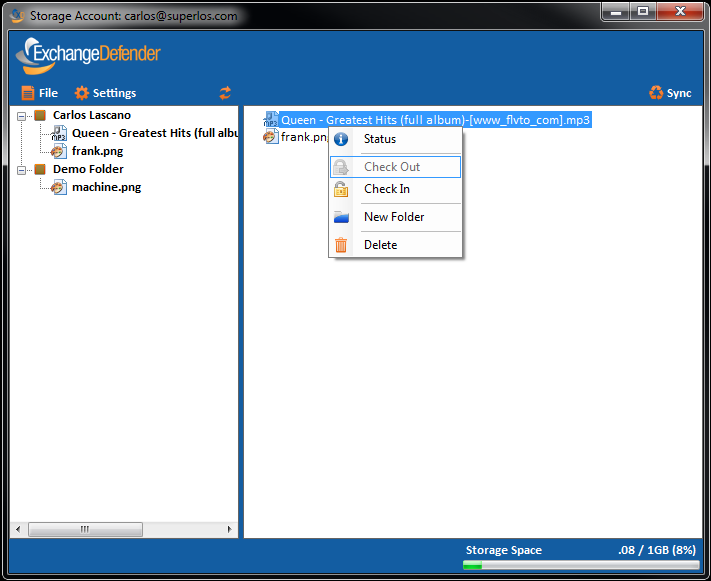
In LocalCloud 2.0 we now have shared folders, access to which can be granted and removed directly from the ExchangeDefender user interface that the users are already familiar with and deal with daily for SPAM reports and business continuity. Same application – same management.
Due to a ton of demand we’ve also built in a process to lock files. For example, let’s say you’re editing an important document that you don’t want another user on the network to modify. You can check the file out, preventing anyone else write access until you’ve completed your work.
Lot’s of other surprises, business model implementations and feedback from our partner community will also be shared.
P.S. We might even say a thing or two about the Unicorn, but you have to tune in for that one. 
Sincerely,
Vlad Mazek
CEO, Own Web Now Corp
vlad@ownwebnow.com
(877) 546-0316 x500
How To Maintain a Company Blog & Why It’s Important
Most companies have great intentions when creating their websites to “get more social.” If you head to most business based websites you will see the usual Facebook and twitter buttons, links about products and services, and then, like a lost puppy all sad and alone there is the blog tab. A click on this link will many times bring you to a page with a number of posts, usually with sporadic dates and the last post being somewhere aroundY2K. Ok maybe it’s not quite that bad but you get the picture.
Many consider blogging to be a difficult task. Most will use excuses like “I don’t have time to write” or “I can’t think of anything to post.” The reality is these are just excuses and there are many reasons for keeping your company blog updated.
Why are Blogs Important?
1. Google loves Blogs
Fresh content to your site is favorable in getting your page organically to the top of Google. The more often you post the better you will fair and being higher on the list equals more business.
2. Blogs help keep customers informed
Though a company blog may not be the best place to open up about social, religious, or political topics; they are a great place to discuss emerging trends, new products and services, as well and local outreach.
3. Self Promotion and Employee Recognition
A blog is a great place to recognize employee accomplishments, announce big wins, and show off work. It adds a touch of personalization and can allow potential as well as current customers insight into the day-to-day business.
How to Maintain a Blog
1. Post something Daily
This may sound harder than it actually is but many of us post to social sites like Facebook everyday so why not to our websites? Easy ways to post daily can be to create photo based posts or video posts not only are these easy, but they are also great for Google.
2. Recruit Employees to Help
Assign employees a day of the week in which they are responsible to have a post written. Make sure that you provide expectations upfront and hold them accountable for the posts.
3. Make a list of Topics
It is much easier to get inspiration when you know what you want to write about. Some people find it easier to write down titles or topics of posts to be written. This can help the creative process and remind you of the things that are most important.
4. Write about your New and Existing Customers
Linking to your customer’s sites and providing promotion is a great way to drive traffic, add exposure, and give customers some additional love. They will appreciate the effort and it will provide an all around good feel to your site.
Either Do it or Don’t
1. Having a Blog post from Y2K as your last entry will not look good to anyone who goes to your blog page. If you aren’t going to be somewhat consistent you may consider removing the page.
2. Don’t get over opinionated in a business blog save those rants for a personal blog.
3. Do provide industry news and trends to keep customers informed.
4. Do have fun!
With a little effort and planning it is easy to turn that blog tab into a thriving part of your website. It will help breathe new life into your business as well as social makeup and give visitors an added benefit to your site. The advantage of climbing the ladder on Google will payoff in more business and revenue. Don’t expect results over night, but if you stay consistent and follow some of the advice outlined, you will be sure to have success with your company blog.
Frank Gurnee
VP, Channel Services, ExchangeDefender
(877) 546-0316 x4777
frank@ownwebnow.com
How Do I Send Emails from Our Scanner/Monitoring/Dog House After Switching to Hosted Exchange?
One of the common questions we get asked from partners after setting up Hosted Exchange is “How do I setup XYZ device to send mail now that we switched to Hosted Exchange?” For most setups, the easiest way (if the client has a static IP) is to add the clients IP as an additional “outbound IP” in ExchangeDefender under the domain configuration section.
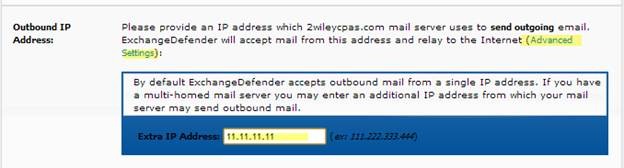
Alternatively, partners can also refer to the SMTP list for Hosted Exchange for the SMTP settings for each Hosted Exchange network. If the device being setup does not support authentication or SSL encryption then the partner would have to create a support request to see if there is any way we can accommodate the client’s request.
Travis Sheldon
VP, Network Operations, ExchangeDefender
(877) 546-0316 x757
travis@ownwebnow.com